# 관련링크
- [재생목록](https://www.youtube.com/playlist?list=PLE0hRBClSk5LcmLiUqdeGeP6zBahhLjx2)
# 1강
- [1강, 프로젝트 세팅](https://youtu.be/4Ceg2QrXkpM)
- [리포지터리 - https://github.com/jhs512/p-13969-1](https://github.com/jhs512/p-13969-1)
- [신규 - https://github.com/jhs512/p-14168-2](https://github.com/jhs512/p-14168-2)
- [커밋](https://github.com/jhs512/p-13969-1/commit/ae0c2b6)
- [신규](https://github.com/jhs512/p-14168-2/commit/001)
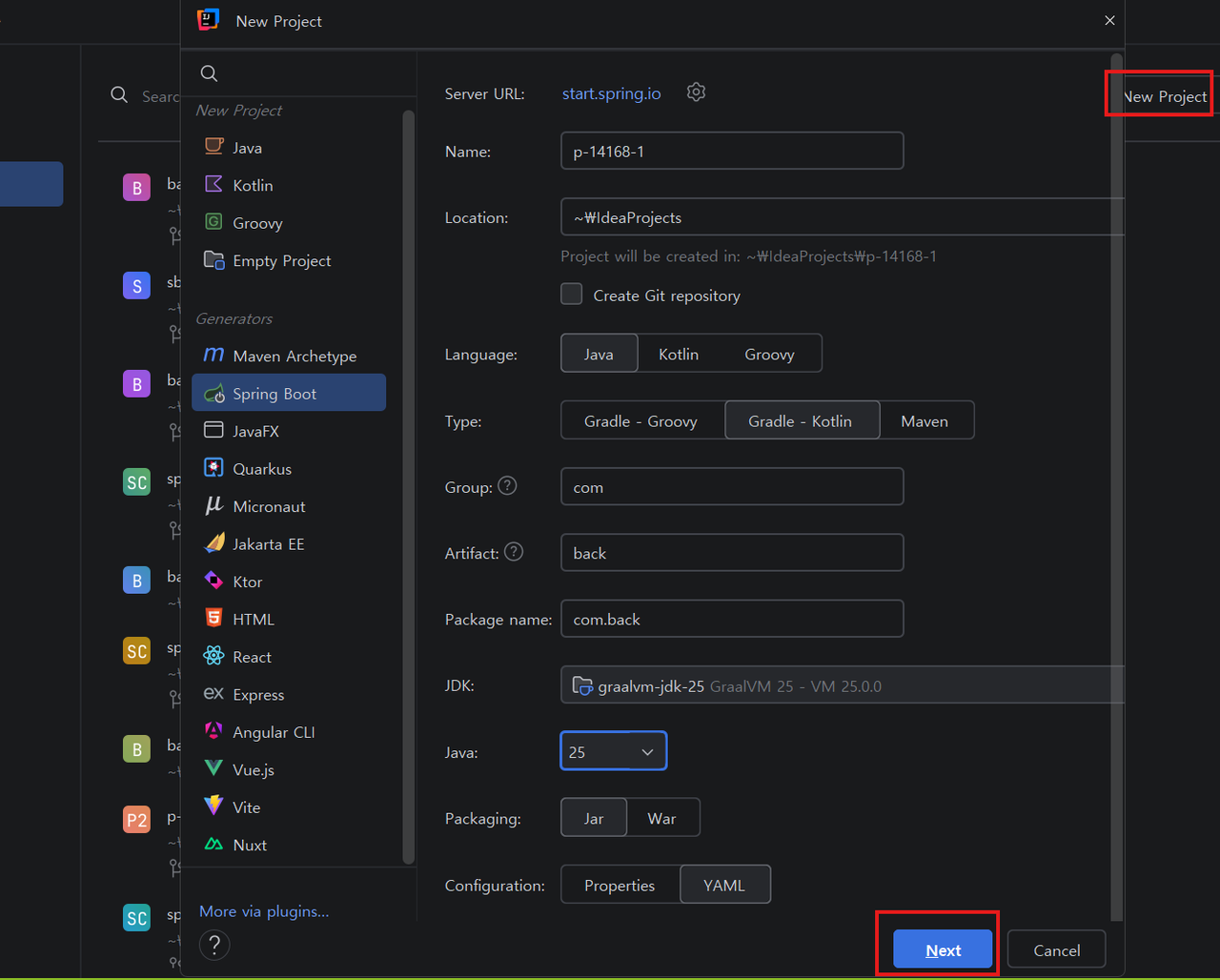
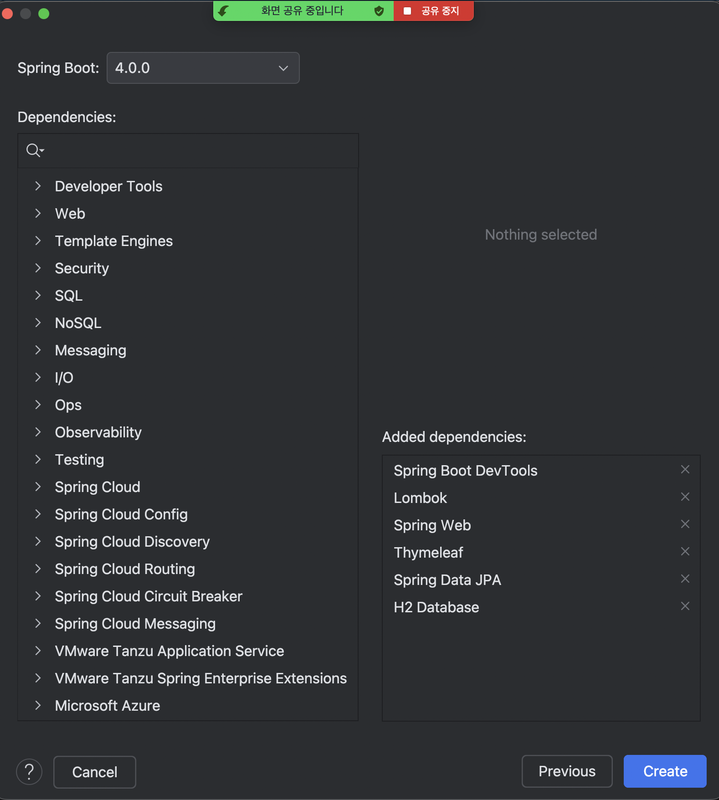
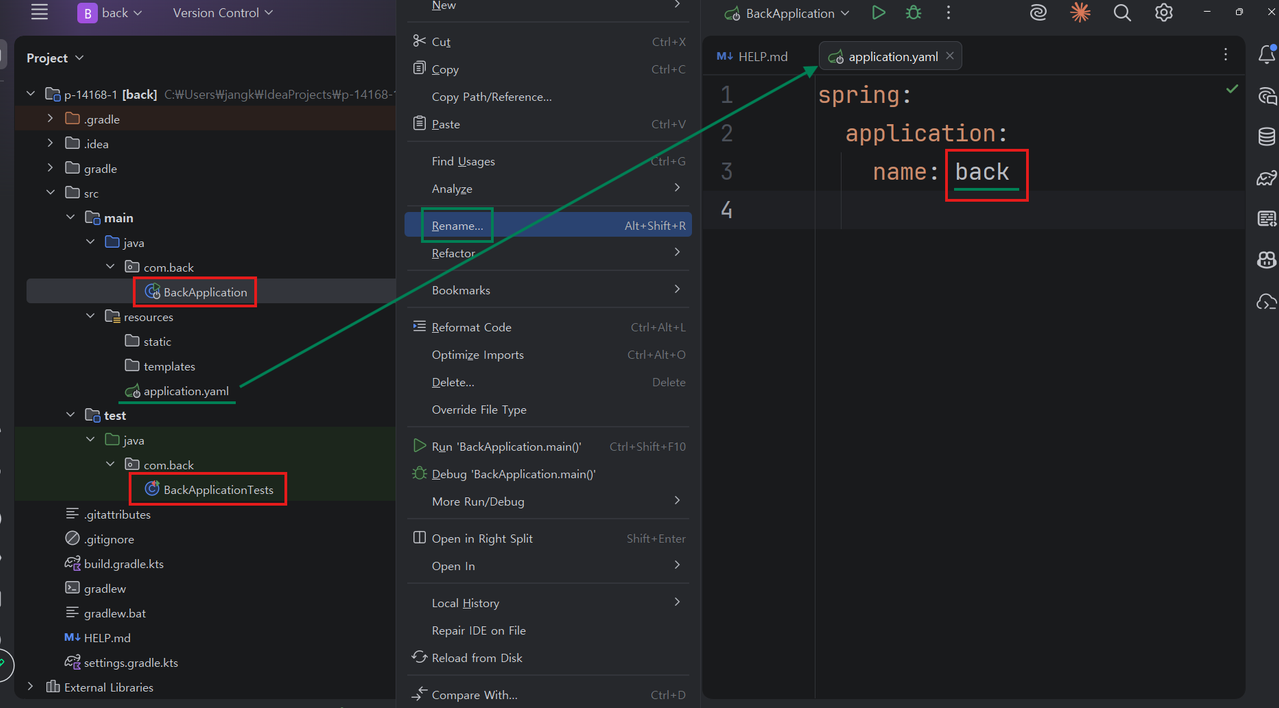
## 프로젝트 생성 by 인텔리제이 얼티메이트
- 
- 
- 
## git 연결
```bash
git init
git remote add origin https://github.com/jhs512/p-14168-1
git add .
git commit -m "001"
git push origin main
```
# 2강
- [2강, 샘플 데이터(글 3건) 자동으로 생성되도록](https://youtu.be/t89iIYmi7RA)
- [커밋](https://github.com/jhs512/p-13969-1/commit/94bc52b)
- [신규](https://github.com/jhs512/p-14168-2/commit/002)
## 작업 순서
1. 목표 : 샘플 데이터 3개를 만들기 위해서 일단 ApplicationRunner 빈을 만든다.
- 스프링부트가 시작하자 마자 샘플 데이터가 자동으로 만들어져야 한다.
- 그래서 ApplicationRunner 빈을 만들고 거기서 샘플 데이터 생성하는 일을 수행해야 한다.
- 빈을 등록하려면 @Configuration 붙은 클래스가 필요하다.
- com.back.global.initData.BaseInitData.java 생성
2. 목표 : 빈에서 PostService를 사용하여 샘플 데이터 3개를 만든다.
- PostService를 이용해서 샘플 데이터 3개 만드는 코드를 구현
- PostService가 아직 없기 때문에 당연히 오류가 발생한다.
- com.back.domain.post.post.service.PostService.java 생성
3. 목표 : PostService 구현
- PostRepository를 사용하여 count, write 메서드 구현 구현
- PostRepository가 아직 없기 때문에 당연히 오류가 발생한다.
- com.back.domain.post.post.repository.PostRepository.java 생성
4. 목표 : PostRepository 구현
- JpaRepository 인터페이스와 Post 엔티티를 사용하여 구현
- Post 엔티티가 아직 없기 때문에 당연히 오류가 발생한다.
- com.back.domain.post.post.entity.Post.java 생성
5. 목표 : Post 엔티티 구현
- 관련 어노테이션 추가
- title, contnet 필드 추가
- BaseEntity 상속
- BaseEntity가 아직 없기 때문에 당연히 오류가 발생한다.
- com.back.global.jpa.entity.BaseEntity.java 생성
6. 목표 : BaseEntity 구현
- 관련 어노테이션 추가
- id, createDate, modifyDate 필드 추가
- @EntityListeners(AuditingEntityListener.class) 때문에 BackApplication.java 에 @EnableJpaAduting 추가
- 이렇게 완성된 Post 엔티티를 통해서 테이블이 자동으로 만들어져야 한다.
- application.yml, application-dev.yml, application-test.yml 세팅
7. 목표 : application.yml, application-dev.yml, application-test.yml 세팅
- ddl-auto: update
- dev 모드에서는 H2 파일DB 사용
- test 모드에서는 H2 메모리DB 사용
- 기타 다른 유용한 설정도 추가
- 파일DB는 GIT에 저장되면 안된다.
- .gitignore 에 db_dev.mv.db, db_test.mv.db 추가
8. 목표 : .gitignore 에 db_dev.mv.db, db_test.mv.db 추가
- .gitignore 에 db_dev.mv.db, db_test.mv.db 추가
# 3강
- [3강, 폼은 단순히 URL 생성기에 불과하다.](https://youtu.be/jvpAGYpQeNU)
- [CODEPEN](https://codepen.io/jangka44/pen/zxGmwgN?editors=1000)
## 복잡한 URL을 직접 작성하는 것은 불편
- 복잡한 URL을 직접 작성하는 것은 불편
- 폼 == URL 생성기
- 폼을 이용하면 사용자가 복잡한 URL 쉽게 만들어 낼 수 있다.
# 4강
- [4강, 글 작성 폼](https://youtu.be/vf2JaW0rebQ)
- [커밋](https://github.com/jhs512/p-13969-1/commit/7fdf4c4)
- [신규](https://github.com/jhs512/p-14168-2/commit/004)
## 엔드포인트
- 글 작성 폼 : [http://localhost:8080/wiseSayings/write](http://localhost:8080/wiseSayings/write)
- 폼의 action(전송 URL) : [http://localhost:8080/wiseSayings/doWrite?title=제목입니다.content=내용입니다.](http://localhost:8080/wiseSayings/doWrite?title=제목입니다.content=내용입니다.)
# 5강
- [5강, 폼의 주소와 action 주소의 앞 부분이 일치하면 그 부분은 생략해도 된다.](https://youtu.be/lJYrl-mL2yM)
- [커밋 - 프로토콜/도메인/포트 생략](https://github.com/jhs512/p-13969-1/commit/a0b9850)
- [신규](https://github.com/jhs512/p-14168-2/commit/005-1)
- [커밋 - 겹치는 path 생략](https://github.com/jhs512/p-13969-1/commit/aa0e470)
- [신규](https://github.com/jhs512/p-14168-2/commit/005-2)
# 6강
- [6강, 폼을 전송하면 /posts/doWrite 액션 메서드에 의해서 글이 작성된다.](https://youtu.be/BIvhs_hkXHY)
- [커밋](https://github.com/jhs512/p-13969-1/commit/03efb3e)
- [신규](https://github.com/jhs512/p-14168-2/commit/006)
# 7강
- [7강, 폼 전송시에는 GET(조회)이 아니라 POST(생성)을 사용해야 한다.](https://youtu.be/3PPvOqEcYkw)
- [커밋](https://github.com/jhs512/p-13969-1/commit/451c182)
- [신규](https://github.com/jhs512/p-14168-2/commit/007)
## HTTP 메소드 표
| HTTP 메소드 | 설명 | 멱등성 |
|------------|------|--------|
| GET | 리소스 조회 | O |
| POST | 리소스 생성 | X |
| PUT | 리소스 완전 수정 | O |
| DELETE | 리소스 삭제 | O |
| HEAD | GET과 동일하지만 응답 본문을 제외하고 상태 줄과 헤더만 반환 | O |
| OPTIONS | 대상 리소스에 대한 통신 가능 옵션을 설명 | O |
| TRACE | 대상 리소스에 대한 경로를 따라 메시지 루프백 테스트 수행 | O |
## 멱등성이란?
- 같은 작업을 여러 번 해도 결과가 달라지지 않는 성질
- TV 채널을 5번으로 맞추는 것처럼, 몇 번을 해도 계속 5번 채널이 나옴
- 이런경우를 멱등성이 있다고 함
- 쇼핑몰에서 같은 상품을 여러 번 주문하면 주문이 여러 개 생기는 것과는 다름
- 이런경우를 멱등성이 없다고 함
- GET, PUT, DELETE는 멱등성이 있어서 여러 번 실행해도 안전함
- 자동으로 그렇게 되는건 아니고 개발자가 그렇게 되도록 구현해야 합니다.
- POST는 멱등성이 없어서 여러 번 실행하면 문제가 생길 수 있음
- 보통 POST에 대한 처리를 할때는 멱등성에 신경을 안쓰는게 보통입니다.
# 8강
- [8강, 실제 구현시 멱등성은 참고만 해주세요. 꼭 준수할 필요는 없습니다.](https://youtu.be/BeV3HirvVLg)
# 9강
- [9강, 폼 데이터 처리시에 유효성 체크, 유효하지 않으면 폼을 다시 보여줌](https://youtu.be/EyNDIJEptRE)
- [커밋 : PostController 를 controller 패키지로 옮김, title, content 필드에 대한 유효성 체크](https://github.com/jhs512/p-13969-1/commit/5120dfb)
- [신규](https://github.com/jhs512/p-14168-2/commit/009-1)
- [커밋 : title 필드 체크 후 유효하지 않으면 메세지 뿐 아니라 폼까지 보여줌](https://github.com/jhs512/p-13969-1/commit/e2849fb)
- [신규](https://github.com/jhs512/p-14168-2/commit/009-2)
- [커밋 : content 필드 체크 후 유효하지 않으면 메세지 뿐 아니라 폼까지 보여줌](https://github.com/jhs512/p-13969-1/commit/a30adf7)
- [신규](https://github.com/jhs512/p-14168-2/commit/009-3)
- [커밋 : getWriteFormHtml 함수 도입해서 폼관련 중복제거](https://github.com/jhs512/p-13969-1/commit/71c434a)
- [신규](https://github.com/jhs512/p-14168-2/commit/009-4)
# 10강
- [10강, 폼을 다시 보여줄 때 기존의 입력값들은 유지되도록](https://youtu.be/PCBZ8KdbCvw)
- [커밋 : 폼을 다시 보여줄 때 기존의 입력값들은 유지되도록](https://github.com/jhs512/p-13969-1/commit/80d494e)
- [신규](https://github.com/jhs512/p-14168-2/commit/010-1)
- [커밋 : 엘리먼트 속성 autofocus를 이용해서 기본적으로는 title 필드가 포커스 되도록](https://github.com/jhs512/p-13969-1/commit/b434638)
- [신규](https://github.com/jhs512/p-14168-2/commit/010-2)
- [커밋 : 유효성 체크 실패시 문제가 되는 필드가 포커스 되도록](https://github.com/jhs512/p-13969-1/commit/3c6b891)
- [신규](https://github.com/jhs512/p-14168-2/commit/010-3)
# 11강
- [11강, Validation 의존성 추가, 클래스에 @Validated, 매개변수에 @NotBlank, @Size](https://youtu.be/AWIEqNfVqEs)
- [커밋 : 제목의 유효길이 : 2자 ~ 20자, 내용의 유효길이 : 2자 ~ 100자](https://github.com/jhs512/p-13969-1/commit/a8fefab)
- [신규](https://github.com/jhs512/p-14168-2/commit/011-1)
- [커밋 : Validation 의존성 추가, 클래스에 @Validated, 매개변수에 @NotBlank, @Size](https://github.com/jhs512/p-13969-1/commit/3e205d9)
- [신규](https://github.com/jhs512/p-14168-2/commit/011-2)
## 작업
- Validation 라이브러리를 사용해서 선언적인 유효성 체크로 변경
# 12강
- [12강, 액션 메서드의 입력값을 객체로 모아서 받기 == @ModelAttribute, @Valid 사용하면 @Validated 는 제거가능](https://youtu.be/gQYOVAWaoHo)
- [커밋](https://github.com/jhs512/p-13969-1/commit/88808c4)
- [신규](https://github.com/jhs512/p-14168-2/commit/012)
## @ModelAttribute
- `WriteForm form` 는 `@ModelAttribute("writeForm") WriteForm form` 의 축약형 이다.
- 스프링 MVC에서 폼 데이터를 객체로 바인딩할 때 사용하는 어노테이션
- HTTP 요청의 파라미터들을 자바 객체의 필드에 자동으로 매핑
- 기본적으로 생략 가능하지만, 명시적으로 사용하면 코드의 가독성이 향상됨
- 예시: `@ModelAttribute WriteForm form` 또는 `@ModelAttribute("writeForm") WriteForm form`
- 모델에 자동으로 추가되어 뷰에서 접근 가능
- 폼 검증과 함께 사용할 때 `@Valid`와 조합하여 사용
## 작업
- @RequestParam을 통한 디폴트 값 설정은 제거했습니다.
- 어차피 @NotBlack를 통해서 빈값이 들어오면 유효성 체크에서 걸리기 때문에 디폴트 값을 설정해줄 필요가 없습니다.
# 13강
- [13강, BindingResult 사용해서 유효성 실패시 무조건 예외가 던져지는 것을 막고 그 이후 상황을 커스터마이징](https://youtu.be/9rq25PJJEEI)
- [커밋 - BindingResult 사용해서 유효성 실패시 무조건 예외가 던져지는 것을 막음](https://github.com/jhs512/p-13969-1/commit/125937a)
- [신규](https://github.com/jhs512/p-14168-2/commit/013-1)
- [커밋 - bindingResult 객체에서 대표 에러를 하나 가져와서 에러의 내용을 폼에 출력](https://github.com/jhs512/p-13969-1/commit/5214d82)
- [신규](https://github.com/jhs512/p-14168-2/commit/013-2)
- [커밋 - 유효성 어노테이션에 커스텀 메세지 추가](https://github.com/jhs512/p-13969-1/commit/6c77862)
- [신규](https://github.com/jhs512/p-14168-2/commit/013-3)
## 작업
- `@Valid WriteForm form` 매개변수 뒤에 `BindingResult bindingResult` 추가
- 꼭 2개의 매개변수를 위의 순서대로 나열해야 제대로 작동합니다.
# 14강
- [14강, getFieldErrors() 와 스트림을 이용해서 모든 에러 메세지를 보여줌](https://youtu.be/hrOkwgud1rI)
- [커밋 - getFieldErrors() 와 스트림을 이용해서 모든 에러 메세지를 보여줌](https://github.com/jhs512/p-13969-1/commit/607682a)
- [신규](https://github.com/jhs512/p-14168-2/commit/014-1)
- [커밋 - 커스텀 메세지 앞에 숫자를 넣어서 메세지 순서를 정함](https://github.com/jhs512/p-13969-1/commit/04580f8)
- [신규](https://github.com/jhs512/p-14168-2/commit/014-2)
# 15강
- [15강, 에러 중 가장 처음 에러의 필드가 focus 되도록](https://youtu.be/vBbQY5D8ZS4)
- [커밋 - 커스텀 메세지 앞에 필드명을 추가](https://github.com/jhs512/p-13969-1/commit/d354001)
- [신규](https://github.com/jhs512/p-14168-2/commit/015-1)
- [커밋 - 커스텀 메세지를 li로 감싸고 data-error-field-name 속성 추가, li 앞에 주석으로 번호 추가](https://github.com/jhs512/p-13969-1/commit/92f9f7a)
- [신규](https://github.com/jhs512/p-14168-2/commit/015-2)
- [커밋 - sorted 처리하여 정렬, 이제 프론트에서 자체적으로 에러 ul의 첫번째 li와 관련된 필드가 focus 되도록 구현](https://github.com/jhs512/p-13969-1/commit/05b8ae5)
- [신규](https://github.com/jhs512/p-14168-2/commit/015-3)
## 에러 메세지와 폼 필드의 포커스
- [CODEPEN - 1 단계](https://codepen.io/jangka44/pen/wBGxBdY?editors=1010)
- [CODEPEN - 2 단계](https://codepen.io/jangka44/pen/myPjyMX?editors=1010)
# 16강
- [16강, 타임리프 도입](https://youtu.be/LVBW-o7Ivyw)
- [커밋 - write.html 도입](https://github.com/jhs512/p-13969-1/commit/9954cb4)
- [신규](https://github.com/jhs512/p-14168-2/commit/016-1)
- [커밋 - getWriteFormHtml 함수 제거, writeDone.html 도입](https://github.com/jhs512/p-13969-1/commit/91eae94)
- [신규](https://github.com/jhs512/p-14168-2/commit/016-2)
- [커밋 - th:text는 이스케이프를 하기에 HTML이 렌더링 되지 않는다.](https://github.com/jhs512/p-13969-1/commit/d496d67)
- [신규](https://github.com/jhs512/p-14168-2/commit/016-3)
- [커밋 - th:utext는 이스케이프를 하지 않기에 HTML이 렌더링 된다.](https://github.com/jhs512/p-13969-1/commit/85022bb)
- [신규](https://github.com/jhs512/p-14168-2/commit/016-4)
- [커밋 - writeForm.title, writeForm.content 를 사용해서 폼 필드의 값이 유지되도록, 다만 이렇게하면 GET /posts/write 는 실패한다.](https://github.com/jhs512/p-13969-1/commit/9bf97ea)
- [신규](https://github.com/jhs512/p-14168-2/commit/016-5)
- [커밋 - writeForm?.title, writeForm?.content 를 사용, 이렇게하면 GET /posts/write 가 잘 작동한다.](https://github.com/jhs512/p-13969-1/commit/5833e40)
- [신규](https://github.com/jhs512/p-14168-2/commit/016-6)
- [커밋 - writeForm.title, writeForm.content 로 다시 변경, showWrite 함수에 `@Valid WriteForm form` 매개변수 추가, 이렇게하면 GET /posts/write 는 다시 실패한다.](https://github.com/jhs512/p-13969-1/commit/b597b9c)
- [신규](https://github.com/jhs512/p-14168-2/commit/016-7)
- [커밋 - `@Valid WriteForm form` 에서 `@Valid` 제거, 이렇게하면 GET /posts/write 가 잘 작동한다.](https://github.com/jhs512/p-13969-1/commit/6bad37e)
- [신규](https://github.com/jhs512/p-14168-2/commit/016-8)
## 타임리프에서 writeForm?.title 와 writeForm.title의 차이
| 구분 | writeForm?.title | writeForm.title |
|------|------------------|-----------------|
| **기능** | 안전한 접근 연산자 사용 | 직접 접근 |
| **null 처리** | writeForm이 null이거나 undefined인 경우 에러 없이 빈 문자열 반환 | writeForm이 null이거나 undefined인 경우 NullPointerException 발생 |
| **사용 시점** | GET 요청 시 writeForm 객체가 없을 때 | POST 요청 후 유효성 검사 실패 시 writeForm 객체가 존재할 때 |
| **안전성** | 안전하게 처리 | 에러 발생 가능성 있음 |
| **예시** | `` | `` |
## writeForm?.title 사용 시나리오
- **GET /posts/write**: writeForm 객체가 없으므로 `writeForm?.title` 사용
- **POST /posts/write (유효성 검사 실패)**: writeForm 객체가 있으므로 `writeForm.title` 사용
## writeForm?.title 대신 writeForm.title 쓰려면 GET /posts/write 에서도 `WriteForm form` 추가해야 하는 이유
- 타임리프에서 `writeForm.title`을 사용하려면 writeForm 객체가 반드시 존재해야 함
- GET /posts/write 요청 시 컨트롤러에서 WriteForm 객체를 생성해서 모델에 추가하지 않으면 writeForm이 null이 되어 NullPointerException 발생
- 따라서 GET 요청 핸들러에서도 `WriteForm form` 매개변수를 추가하여 빈 WriteForm 객체를 생성하고 모델에 바인딩해야 함
- 이렇게 하면 GET과 POST 요청 모두에서 일관되게 `writeForm.title` 사용 가능
## th:text와 th:utext 비교 : user.name에 `홍길동` 이라는 값이 들어 있을 때
| 구분 | th:text | th:utext |
|------|---------|----------|
| **기능** | 텍스트 내용 설정 | HTML 내용 설정 |
| **이스케이프** | HTML 특수문자를 이스케이프 처리 | HTML 특수문자를 이스케이프 처리하지 않음 |
| **보안** | XSS 공격 방지 | XSS 공격 위험 있음 |
| **사용 예시** | `` | `` |
| **대체표현** | `[[${user.name}]]` | `[(${user.name})]` |
| **출력 결과** | `<strong>홍길동</strong>` | `홍길동` |
| **권장사항** | 일반 텍스트에 사용 | 신뢰할 수 있는 HTML 콘텐츠에만 사용 |
# 17강
- [17강, 타임리프 도입 작업 복기](https://youtu.be/7Ghm3vFPHm0)
# 18강
- [18강, 타임리프 캐시 끄고, @ModelAttribute("form") 추가하여 타임리프에서 writeForm 대신 form 으로 사용](https://youtu.be/Mf0Hq1P3bqk)
- [커밋](https://github.com/jhs512/p-13969-1/commit/bf2d9e0)
- [신규](https://github.com/jhs512/p-14168-2/commit/018)
# 19강
- [19강, @ModelAttribute("siteName") 붙은 메서드를 컨트롤러 안에 두면 타임리프에서 해당 메서드의 리턴값 사용가능](https://youtu.be/rRQp6NkghTA)
- [커밋](https://github.com/jhs512/p-13969-1/commit/ec9c627)
- [신규](https://github.com/jhs512/p-14168-2/commit/019)
## 특정 컨트롤러가 아니라 모든 컨트롤러의 액션메서드 실행 시 사용할 공통 템플릿 변수 세팅방법
```java
package com.back.global;
import org.springframework.web.bind.annotation.ControllerAdvice;
import org.springframework.web.bind.annotation.ModelAttribute;
@ControllerAdvice
public class GlobalModelAttribute {
// 모든 컨트롤러의 모든 요청 메서드 실행 전에 자동 실행됨
@ModelAttribute("siteName")
public String siteName() {
return "커뮤니티 사이트 A"; // 모든 컨트롤러에서 공통 사용 가능
}
}
```
# 20강
- [20강, th:block 은 타임리프 렌더링 될 때 본인은 렌더링 되지 않고 자식만 렌더링 된다.](https://youtu.be/AqvdE_FFD3Y)
- [커밋](https://github.com/jhs512/p-13969-1/commit/10c8679)
- [신규](https://github.com/jhs512/p-14168-2/commit/020)
## th:block 사용
### 전체
- name 템플릿 변수에 `홍길동` 값이 설정되어 있음
### 타임리프
```html
입니다.
```
### 렌더링 결과
```html
홍길동 입니다.
```
# 21강
- [21강, label 태그의 for 속성은 관련된 input 요소의 id를 넣는게 규칙이지만 꼭 준수할 필요는 없다.](https://youtu.be/5_ux6gL4Leg)
- [커밋](https://github.com/jhs512/p-13969-1/commit/cce5e0f)
- [신규](https://github.com/jhs512/p-14168-2/commit/021)
## label 태그의 정석 사용법(for, id 사용)
- [CODEPEN](https://codepen.io/jangka44/pen/gbrjaOP?editors=1000)
## label 태그의 보편적 사용법(for, id 무시)
- [CODEPEN](https://codepen.io/jangka44/pen/YPqjyXK?editors=1000)
## label 태그의 현대적 사용법(label 엘리먼트 안 input 엘리먼트가 위치)
- [CODEPEN](https://codepen.io/jangka44/pen/WbwKQvj?editors=1000)
# 22강
- [22강, th:object, th:field 이용하면 필드 관련 중복된 코드를 많이 줄일 수 있다.](https://youtu.be/RtSB9IOkpLI)
- [커밋 - th:object를 이용하면 해당 엘리먼트 안에서는 `form.` 같은 접두어를 생략할 수 있다.](https://github.com/jhs512/p-13969-1/commit/1a114e1)
- [신규](https://github.com/jhs512/p-14168-2/commit/022-1)
- [커밋 - th:field를 이용하면 name, id, value 속성을 자동으로 추가해준다.](https://github.com/jhs512/p-13969-1/commit/848911d)
- [신규](https://github.com/jhs512/p-14168-2/commit/022-2)
- 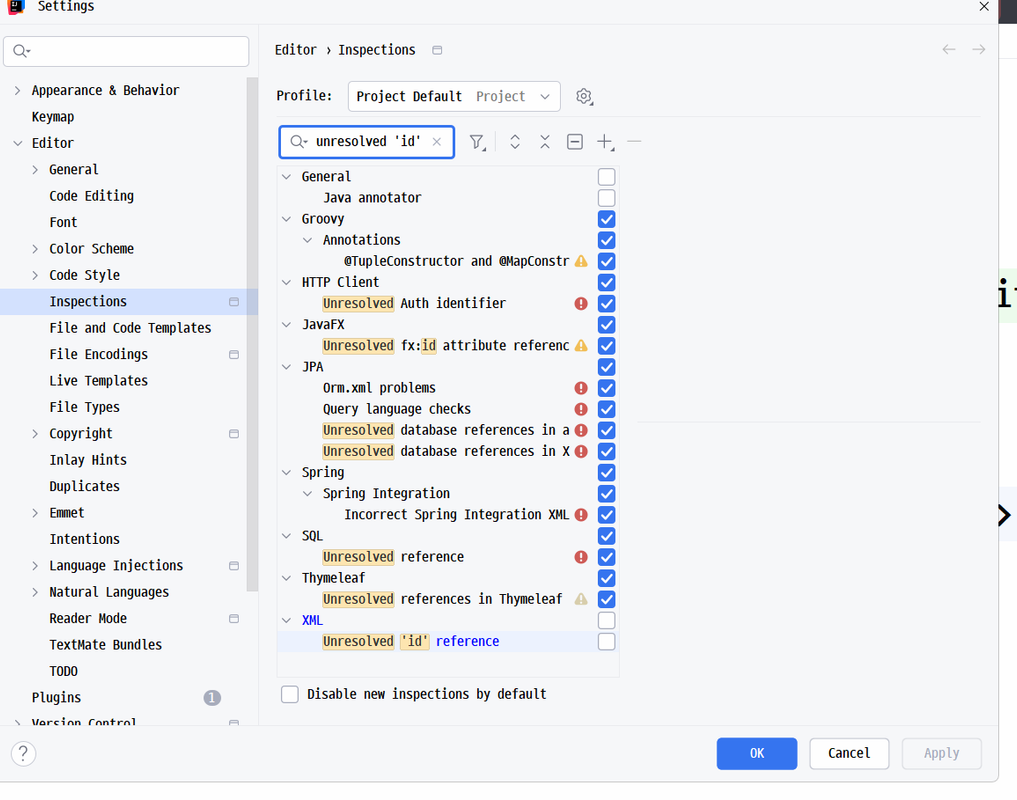
- `unresolved 'id'` 라고 검색 후 체크해제하면 label 태그의 for 관련된 경고가 사라진다.
# 23강
- [23강, errorMessage 를 직접 만들기 않고 #fields 이용해서 타임리프에서 직접 에러 메세지 출력, focus 관련 자바스크립트는 일단 제거](https://youtu.be/Ds7H5vOcESs)
- [커밋 - errorMessage 를 직접 만들기 않고 #fields 이용해서 타임리프에서 직접 에러 메세지 출력](https://github.com/jhs512/p-13969-1/commit/8f901b2)
- [신규](https://github.com/jhs512/p-14168-2/commit/023-1)
- [커밋 - 에러 메세지 출력 순서 정렬, HTML 구조가 바뀌었기 때문에 focus 관련 자바스크립트는 일단 제거](https://github.com/jhs512/p-13969-1/commit/9c5d629)
- [신규](https://github.com/jhs512/p-14168-2/commit/023-2)
# 24강
- [24강, 에러 커스텀 메세지에 필드이름을 추가하여 li의 data-error-field-name 속성 복원](https://youtu.be/S97aWiPlD2I)
- [커밋 - 에러 커스텀 메세지에 필드이름을 추가](https://github.com/jhs512/p-13969-1/commit/36f332d)
- [신규](https://github.com/jhs512/p-14168-2/commit/024-1)
- [커밋 - data-error-field-name="title" 일단 이렇게 하드 코딩](https://github.com/jhs512/p-13969-1/commit/d92cea2)
- [신규](https://github.com/jhs512/p-14168-2/commit/024-2)
- [커밋 - data-error-field-name="${err.split('-', 3)[1]}" 로 변경, 앞에 th: 를 안붙여서 실패](https://github.com/jhs512/p-13969-1/commit/17885e3)
- [신규](https://github.com/jhs512/p-14168-2/commit/024-3)
- [커밋 - th: 붙여서 성공](https://github.com/jhs512/p-13969-1/commit/3b2f9d0)
- [신규](https://github.com/jhs512/p-14168-2/commit/024-4)
- [커밋 - th:with 적용하여 한번 split 한 결과를 변수화 하여 사용, 소스코드 가독성이 좋아짐](https://github.com/jhs512/p-13969-1/commit/a5545de)
- [신규](https://github.com/jhs512/p-14168-2/commit/024-5)
# 25강
- [25강, focus 관련 자바스크립트 복원, ul과 같이 묶어서 프래그먼트로 등록 후 사용](https://youtu.be/lJYSAg_w10k)
- [커밋 - 자바스크립트 복원, 이제 ul은 form의 자식이다.](https://github.com/jhs512/p-13969-1/commit/88853bb)
- [신규](https://github.com/jhs512/p-14168-2/commit/025-1)
- [커밋 - 스크립트를 ul 아래에 두면 폼이 완성된 상태가 아니기에 실패](https://github.com/jhs512/p-13969-1/commit/566ef95)
- [신규](https://github.com/jhs512/p-14168-2/commit/025-2)
- [커밋 - focus 하는 코드만 setTimeout 으로 1초 지연](https://github.com/jhs512/p-13969-1/commit/fd40f3f)
- [신규](https://github.com/jhs512/p-14168-2/commit/025-3)
- [커밋 - 0.001초 지연해도 된다.](https://github.com/jhs512/p-13969-1/commit/0b8888a)
- [신규](https://github.com/jhs512/p-14168-2/commit/025-4)
- [커밋 - 지연 시간초는 생략해도 된다.](https://github.com/jhs512/p-13969-1/commit/2c1e99d)
- [신규](https://github.com/jhs512/p-14168-2/commit/025-5)
- [커밋 - 프래그먼트로 등록 후 사용](https://github.com/jhs512/p-13969-1/commit/41ec1f8)
- [신규](https://github.com/jhs512/p-14168-2/commit/025-6)
# 26강
- [26강, `POST`에 이미 `생성` 이라는 뜻이 들어있다. URL이 같아도 메서드가 다르면 스프링이 구분할 수 있다.](https://youtu.be/ZjSQlCZQw_o)
- [커밋 - POST /posts/doWrite 보다 POST /posts/write 가 더 올바른 표현이다.](https://github.com/jhs512/p-13969-1/commit/3d8a63c)
- [신규](https://github.com/jhs512/p-14168-2/commit/026-1)
- [커밋 - action이 가리키는 주소가 현재 페이지라면 생략이 가능하다.](https://github.com/jhs512/p-13969-1/commit/430b419)
- [신규](https://github.com/jhs512/p-14168-2/commit/026-2)
## 현재까지의 액션메서드 구분
- 글쓰기 폼 : GET /posts/write
- 글쓰기 처리 : POST /posts/doWrite
## 앞으로 사용할 액션메서드 구분 : 메서드로 구분할 수 있으니, URL이 서로 다를 필요 없다.
- 글쓰기 폼 : GET /posts/write
- 글쓰기 처리 : POST /posts/write
- 사실 POST에 이미 생성이라는 의미가 들어있다.
- 하지만 이 프로젝트의 경우 REST API 방식이 아니라서 이 정도의 의미중복은 허용되는 분위기 이다.
## 추후 REST API에서 사용할 액션메서드 구분 : 이런경우에는 UI를 프론트(리액트 등)에서 처리하니 폼 보여주는 요청이 없고, URL을 더 엄격하게 하는게 보통이다.
- 글쓰기 폼 : 구현할 필요 없음
- 글쓰기 처리 : POST /posts
- 사실 POST에 이미 생성이라는 의미가 들어있다.
- 그래서 `/write` 라는 것은 필요하지 않다.
- 보통 REST API 방식에서는 URL을 명사형으로 사용한다.(더 엄격하게 URL 규칙을 지키는 분위기 이다.)
# 27강
- [27강, meta 태그에 http-equiv="refresh" content="3;url=/posts/write" 속성을 추가하여 3초 후 리다이렉트](https://youtu.be/Hq5qvhtQNZE)
- [커밋](https://github.com/jhs512/p-13969-1/commit/7d958ea)
- [신규](https://github.com/jhs512/p-14168-2/commit/027)
# 28강
- [28강, content="0;url=/posts/write" 으로 처리하는 것 보다 액션메서드에서 바로 302로 응답하는게 더 간편하다.](https://youtu.be/HtHSi829JJQ)
- [커밋 - content="0;url=/posts/write" 으로 처리](https://github.com/jhs512/p-13969-1/commit/53d535a)
- [신규](https://github.com/jhs512/p-14168-2/commit/028-1)
- [커밋 - 액션메서드에서 바로 302로 응답](https://github.com/jhs512/p-13969-1/commit/dc7fe26)
- [신규](https://github.com/jhs512/p-14168-2/commit/028-2)
## HTTP 응답코드 표
| 코드 | 설명 |
|------|------|
| **1xx** | 정보성 응답 - 요청을 받았고 처리 중 |
| **2xx** | 성공 - 요청이 성공적으로 처리됨 |
| **3xx** | 리다이렉션 - 추가 작업이 필요함 |
| **4xx** | 클라이언트 오류 - 요청에 문제가 있음 |
| **5xx** | 서버 오류 - 서버에서 요청 처리 실패 |
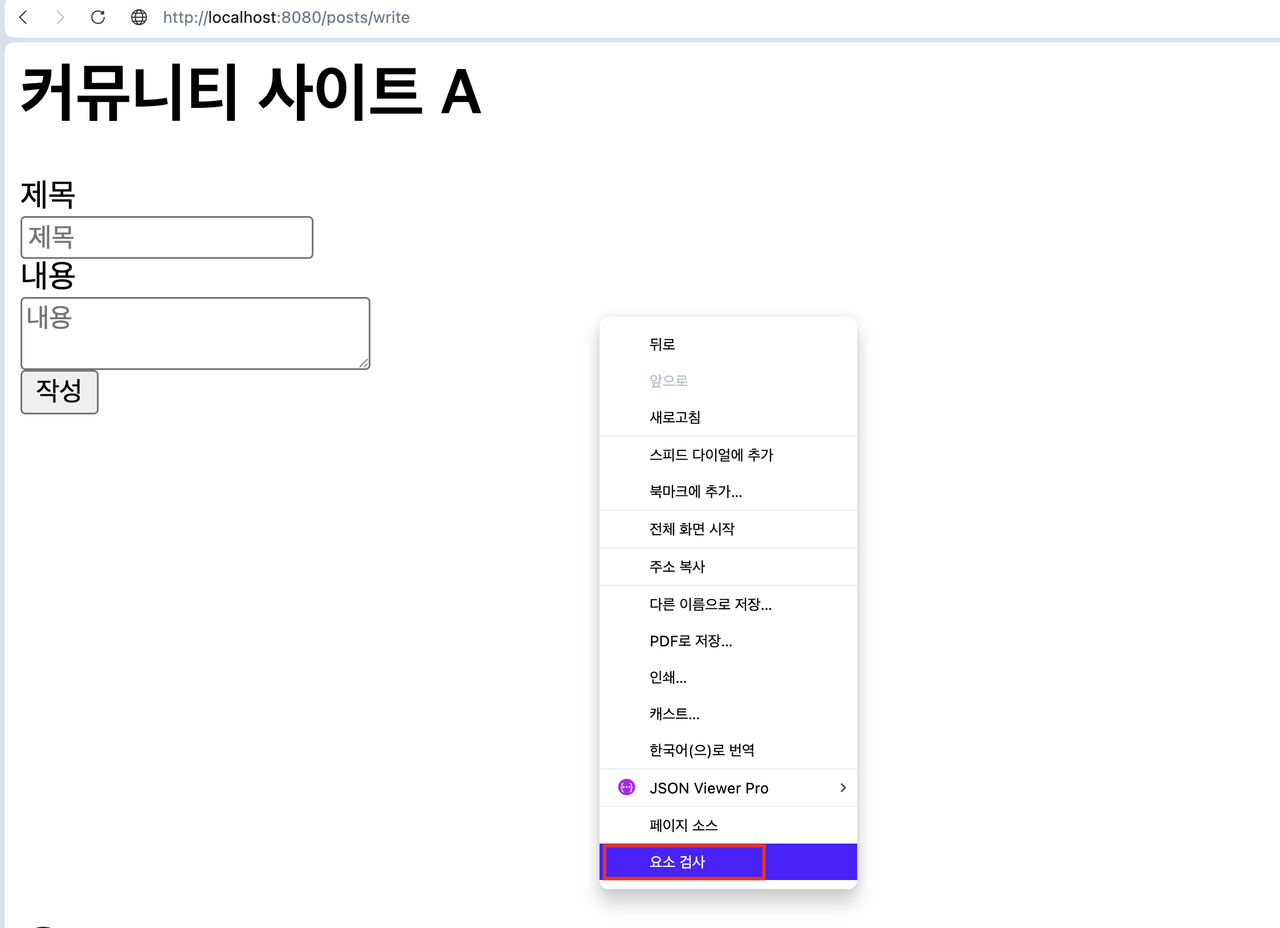
## 브라우저의 네트워크 탭을 통해서 HTTP 통신내역 확인
1. 
1. 브라우저 화면에서 우클릭 후 `요소검사`
1. 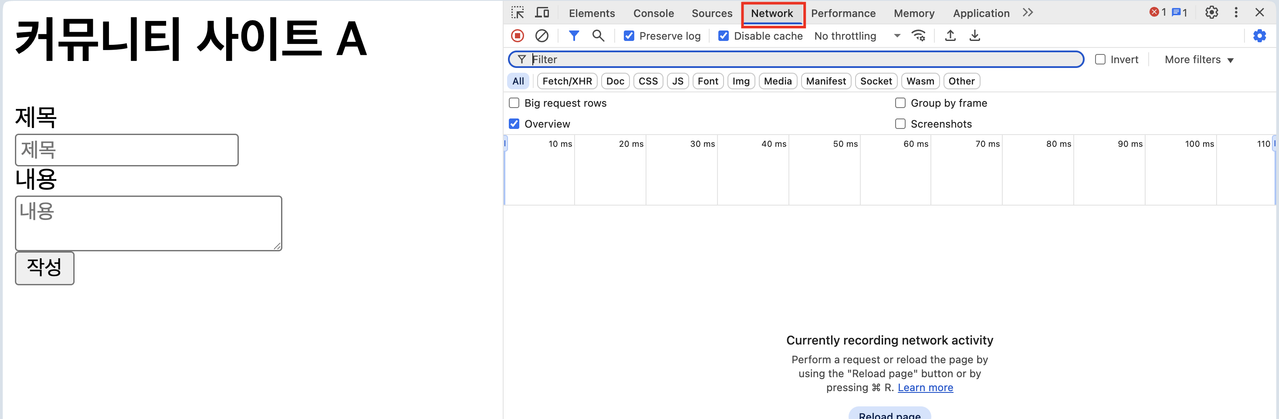
1. 개발자 도구에서 `네트워크 탭`
1. 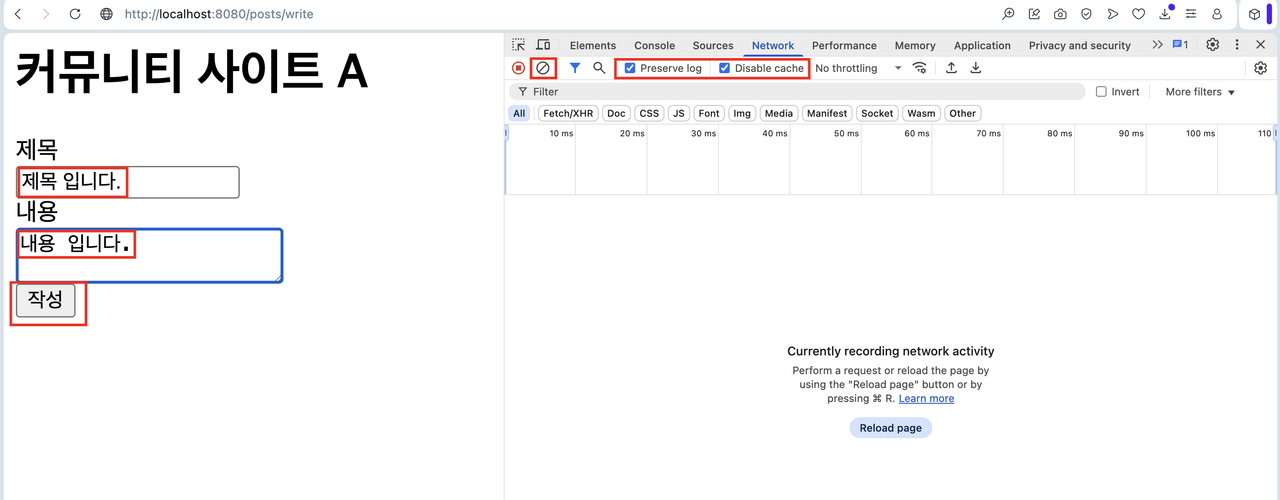
1. `⊘` 눌러서 클리어
1. `Preserve log` 체크
1. `Disable cache` 체크
1. 폼 전송 및 링크 이동
1. 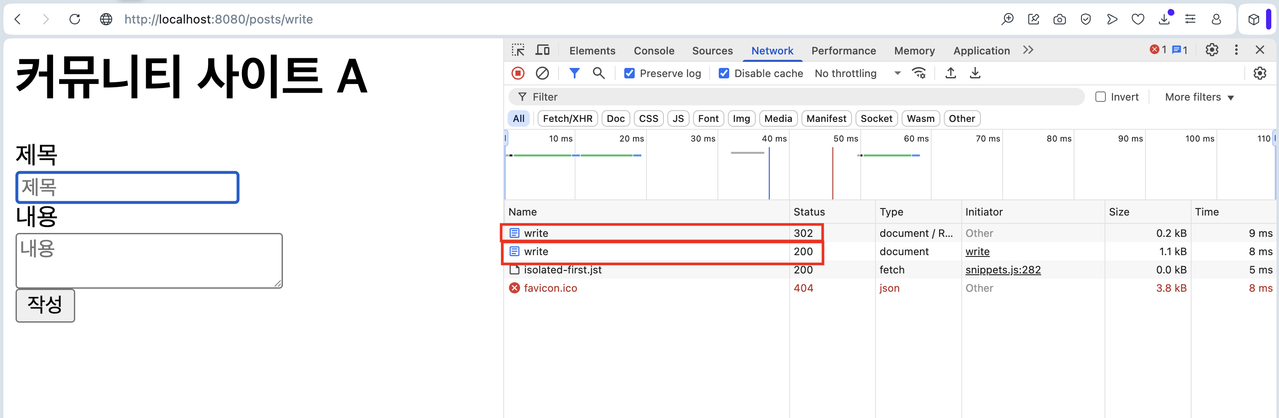
1. 목록에서 클릭하여 상세내용 확인
# 29강
- [29강, 글 상세페이지 구현, 글 목록 페이지는 일단 Post의 List를 리턴(자동으로 JSON으로 변환됨)](https://youtu.be/8K7gWZS2DLQ)
- [커밋 - 상세페이지 구현, 글 작성 완료시 자동으로 생성된 글 상세페이지로 이동](https://github.com/jhs512/p-13969-1/commit/28a7927)
- [신규](https://github.com/jhs512/p-14168-2/commit/029-1)
- [커밋 - 글 본문 보여줄 때 style="white-space: pre-line;" 적용하여 줄바꿈 표시](https://github.com/jhs512/p-13969-1/commit/2700c19)
- [신규](https://github.com/jhs512/p-14168-2/commit/029-2)
- [커밋 - 글 상세페이지에 글 쓰기, 글 목록, 글 수정 링크 추가](https://github.com/jhs512/p-13969-1/commit/2e3820f)
- [신규](https://github.com/jhs512/p-14168-2/commit/029-3)
- [커밋 - 글 수정 링크를 조금 더 타임리프스럽게 변경](https://github.com/jhs512/p-13969-1/commit/5db4512)
- [신규](https://github.com/jhs512/p-14168-2/commit/029-4)
- [커밋 - 글 목록 페이지 구현, 일단은 @ResponseBody 붙이고 List 리턴, 자동으로 JSON으로 변환되어 출력됨](https://github.com/jhs512/p-13969-1/commit/6274945)
- [신규](https://github.com/jhs512/p-14168-2/commit/029-5)
- 참고로 이 방식은 REST API 서버를 구현할 때 사용됩니다.
- 지금은 타임리프 방식이기 때문에 이 방식은 사용하지 않습니다.
- 물론 타임리프 방식도 실시간 UI 처리(FETCH를 이용한)를 할 때 이 방식을 추가로 이용할 수 있습니다.
## JSON Viewer Pro(크롬 익스텐션)
- [JSON Viewer Pro](https://chromewebstore.google.com/detail/json-viewer-pro/eifflpmocdbdmepbjaopkkhbfmdgijcc)
## 스프링부트에서 액션메서드가 객체를 리턴하면 자동으로 JSON화 되어서 반환되는 이유
- **Jackson 라이브러리**: 스프링부트는 기본적으로 Jackson 라이브러리를 포함하고 있어서 객체를 JSON으로 자동 변환
- **@ResponseBody 어노테이션**: 명시적으로 @ResponseBody를 붙이면 스프링이 객체를 HTTP 응답 본문으로 직렬화
- **Content-Type 자동 설정**: JSON으로 변환 시 `Content-Type: application/json` 헤더가 자동으로 설정됨
- **기본 직렬화 규칙**:
- public 필드나 getter 메서드가 있는 private 필드만 JSON에 포함
- null 값은 기본적으로 제외되지만 설정으로 변경 가능
- **커스텀 직렬화**: @JsonIgnore, @JsonProperty 등 어노테이션으로 세부 제어 가능
- **성능 최적화**: Jackson은 고성능 JSON 처리 라이브러리로 대용량 데이터도 효율적으로 처리
## 서버사이드 렌더링만 있는게 아니다. `GET http://locahost:8080/posts`를 통해서 클라이언트 사이드 렌더링을 할 수 있고, 그러면 타임리프가 필요하지 않다.
### src/main/resources/templates/post/post/listByFetch.html
- 아래 코드에 REACT를 도입하면 구현 난이도가 쉬워진다.(그래서 보통 클라이언트 사이드 렌더링시에는 REACT를 사용한다.)
```html
```
# 30강
- [30강, 잭슨은 객체화를 할 때 public 필드이거나 public getter가 있는 필드만 JSON으로 노출한다.](https://youtu.be/AnP7AsQzGbE)
- [커밋 - 이렇게 필드별로 getter의 엑세스 레벨을 조절 할 수 있다.](https://github.com/jhs512/p-13969-1/commit/c29ad86)
- [신규](https://github.com/jhs512/p-14168-2/commit/030-1)
- [커밋 - 다시 원상복구](https://github.com/jhs512/p-13969-1/commit/f5f7403)
- [신규](https://github.com/jhs512/p-14168-2/commit/030-2)
## protected 와 public 차이 표
| 접근 제어자 | 접근 가능 범위 | 설명 |
|------------|---------------|------|
| **protected** | 같은 패키지 OR 상속받은 클래스(자식 클래스) | 같은 패키지 내의 모든 클래스와 다른 패키지의 자식 클래스에서 접근 가능 |
| **public** | 모든 클래스 | 어디서든 접근 가능한 가장 개방적인 접근 제어자 |
## protected vs public 상세 비교
### protected의 특징
- **패키지 내 접근**: 같은 패키지의 모든 클래스에서 접근 가능
- **상속 관계**: 다른 패키지의 자식 클래스에서도 접근 가능
- **캡슐화**: 외부 패키지에서는 상속을 통해서만 접근 가능
## protected 사용예시
```java
protected String name; // 후손 클래스에서 접근 가능
protected void method() {} // 후손 클래스에서 사용 가능
```
### public의 특징
- **완전 개방**: 어디서든 접근 가능
- **API 공개**: 외부에서 사용할 수 있도록 공개하는 메서드/필드
- **주의사항**: 과도한 public 사용은 캡슐화를 해침
## public 사용예시
```java
public String getName() { return name; } // 누구나 접근 가능
public void setData(String data) { this.data = data; } // 공개 API
```
### 언제 어떤 것을 사용할까?
- **protected**: 상속을 통한 확장을 고려하는 클래스 설계 시
- **public**: 외부에서 반드시 사용해야 하는 API 메서드나 상수
# 31강
- [31강, list.html 구현, 상세페이지에 작성날짜, 수정날짜 표시](https://youtu.be/SIhkQ290af8)
- [커밋 - list.html 구현](https://github.com/jhs512/p-13969-1/commit/209bff6)
- [신규](https://github.com/jhs512/p-14168-2/commit/031-1)
- [커밋 - 상세페이지에 작성날짜, 수정날짜 표시](https://github.com/jhs512/p-13969-1/commit/13c47ae)
- [신규](https://github.com/jhs512/p-14168-2/commit/031-2)
## 서버 사이드 렌더링(타임리프)
- [접속 : http://localhost:8080/posts](http://localhost:8080/posts)
### src/main/java/com/back/domain/post/post/controller/PostController.java
```java
package com.back.domain.post.post.controller;
// ...
@Controller
@RequiredArgsConstructor
public class PostController {
private final PostService postService;
// ...
@GetMapping("/posts")
@Transactional(readOnly = true)
public String showList(Model model) { // 데이터 불러오고 템플릿을 렌더링한 결과(HTML)을 리턴하는 함수
List posts = postService.findAll();
model.addAttribute("posts", posts);
return "post/post/list";
}
// ...
}
```
### src/main/resources/templates/post/post/list.html
```html
```
### src/main/resources/templates/post/post/listByFetch.html : REACT 방식
```html
```
# 32강
- [32강, 글 수정 구현, 글 수정은 글 작성 로직과 거의 비슷하다.](https://youtu.be/wPL2nsnwvyA)
- [커밋 - modify.html 구현](https://github.com/jhs512/p-13969-1/commit/5351684)
- [신규](https://github.com/jhs512/p-14168-2/commit/032-1)
- [커밋 - modify 폼에서 발생한 데이터 처리, 수정 후 상세페이지로 이동](https://github.com/jhs512/p-13969-1/commit/88a7261)
- [신규](https://github.com/jhs512/p-14168-2/commit/032-2)
# 33강
- [33강, PostComment 엔티티 추가, 샘플 데이터도 생성](https://youtu.be/lFYaCh9OsKQ)
- [커밋 - PostComment 엔티티 추가, 샘플 데이터도 생성, 하지만 샘플데이터 생성실패](https://github.com/jhs512/p-13969-1/commit/fc90afb)
- [신규](https://github.com/jhs512/p-14168-2/commit/033-1)
- [커밋 - self와 @Transactional의 조합으로 샘플데이터 생성성공](https://github.com/jhs512/p-13969-1/commit/c8b3da4)
- [신규](https://github.com/jhs512/p-14168-2/commit/033-2)
# 34강
- [34강, 댓글 목록 구현](https://youtu.be/2LjQyR1oI-k)
- [커밋](https://github.com/jhs512/p-13969-1/commit/202f022)
- [신규](https://github.com/jhs512/p-14168-2/commit/034)
# 35강
- [35강, 댓글 작성 폼 구현](https://youtu.be/zsCmLTBnat0)
- [커밋 - 댓글 작성 폼 구현](https://github.com/jhs512/p-13969-1/commit/3c33c8c)
- [신규](https://github.com/jhs512/p-14168-2/commit/035-1)
- [커밋 - onsubmit="return false;" 을 통해서 전송 버튼 눌렀을 때 폼이 전송되는 것을 막는다.](https://github.com/jhs512/p-13969-1/commit/53d3e17)
- [신규](https://github.com/jhs512/p-14168-2/commit/035-2)
- [커밋 - onsubmit 이벤트 발생시 PostComment__submitWriteForm 함수가 실행되도록, 해당 함수에서 form을 통해서 필드값에 접근 가능](https://github.com/jhs512/p-13969-1/commit/4947bc9)
- [신규](https://github.com/jhs512/p-14168-2/commit/035-3)
- [커밋 - 유효성 체크를 진행하고 모든 유효성 체크가 성공하면 form.submit(); 에 의해서 폼 전송](https://github.com/jhs512/p-13969-1/commit/c68bf95)
- [신규](https://github.com/jhs512/p-14168-2/commit/035-4)
## 유효성 체크를 서버에서 해야할까요?
- 무조건 해야 합니다.
- 클라이언트에서 유효성 체크를 하더라도 서버에서는 무조건 유효성 체크를 해야 합니다.
## 유효성 체크를 클라이언트에서 해야할까요?
- 꼭 해야하는 것은 아닙니다.
- 다만 대부분의 경우 하면 좋습니다.
- 고객이 쓸데없는 페이지 이동을 경험하지 않게 합니다.
- 더 빠른 피드백을 얻습니다.
# 36강
- [36강, 댓글 작성 처리, 프론트에서 유효성 체크를 미리 했기 때문에 로직이 간단함](https://youtu.be/UCBibM3GDZ4)
- [커밋](https://github.com/jhs512/p-13969-1/commit/7b985f2)
- [신규](https://github.com/jhs512/p-14168-2/commit/036)
## 유효성 체크를 클라이언트와 서버에서 동시에 하면 좋은점
- 서버측 유효성 체크로직이 많이 단순화 됩니다.
- 정말 많이 단순화 됩니다.
## 브라우저 개발자 도구에서 `Disable JavaScript` 설정하여 폼 체크 자바스크립트 유효성 체크 로직을 우회하는 방법
- 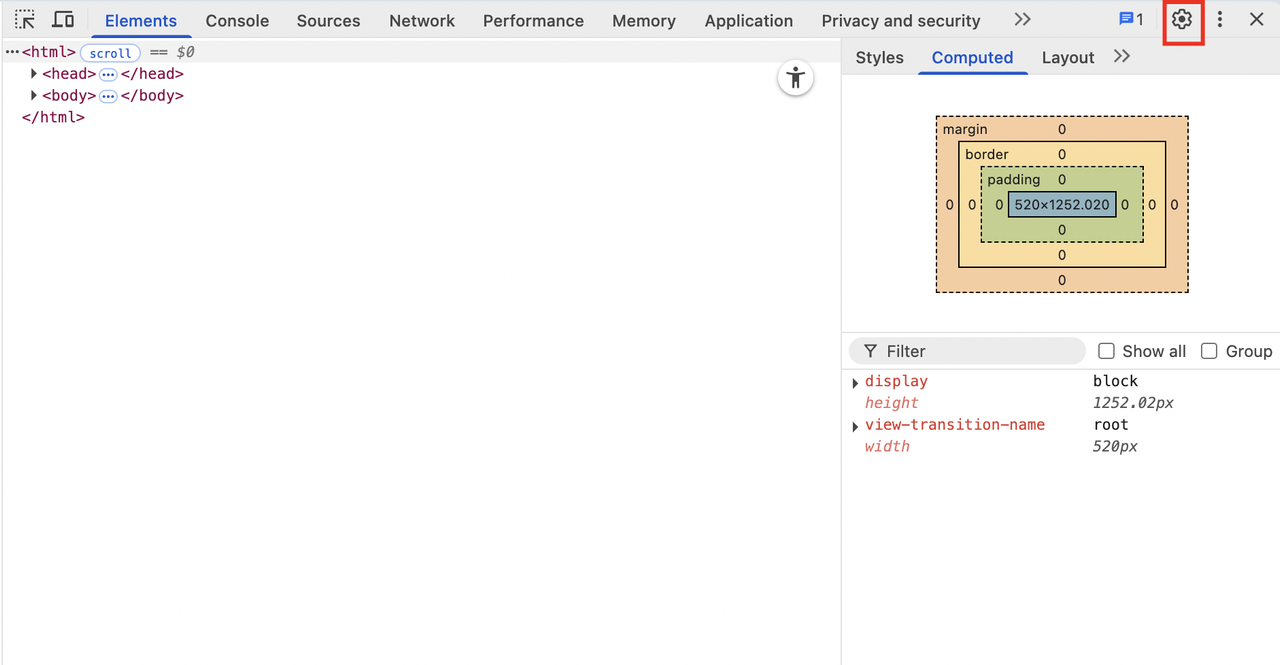
- `브라우저 개발자 도구`는 빈 화면에서 우클릭 하여 `요소 검사` 클릭
- 그 후 톱니바퀴 버튼 클릭
- 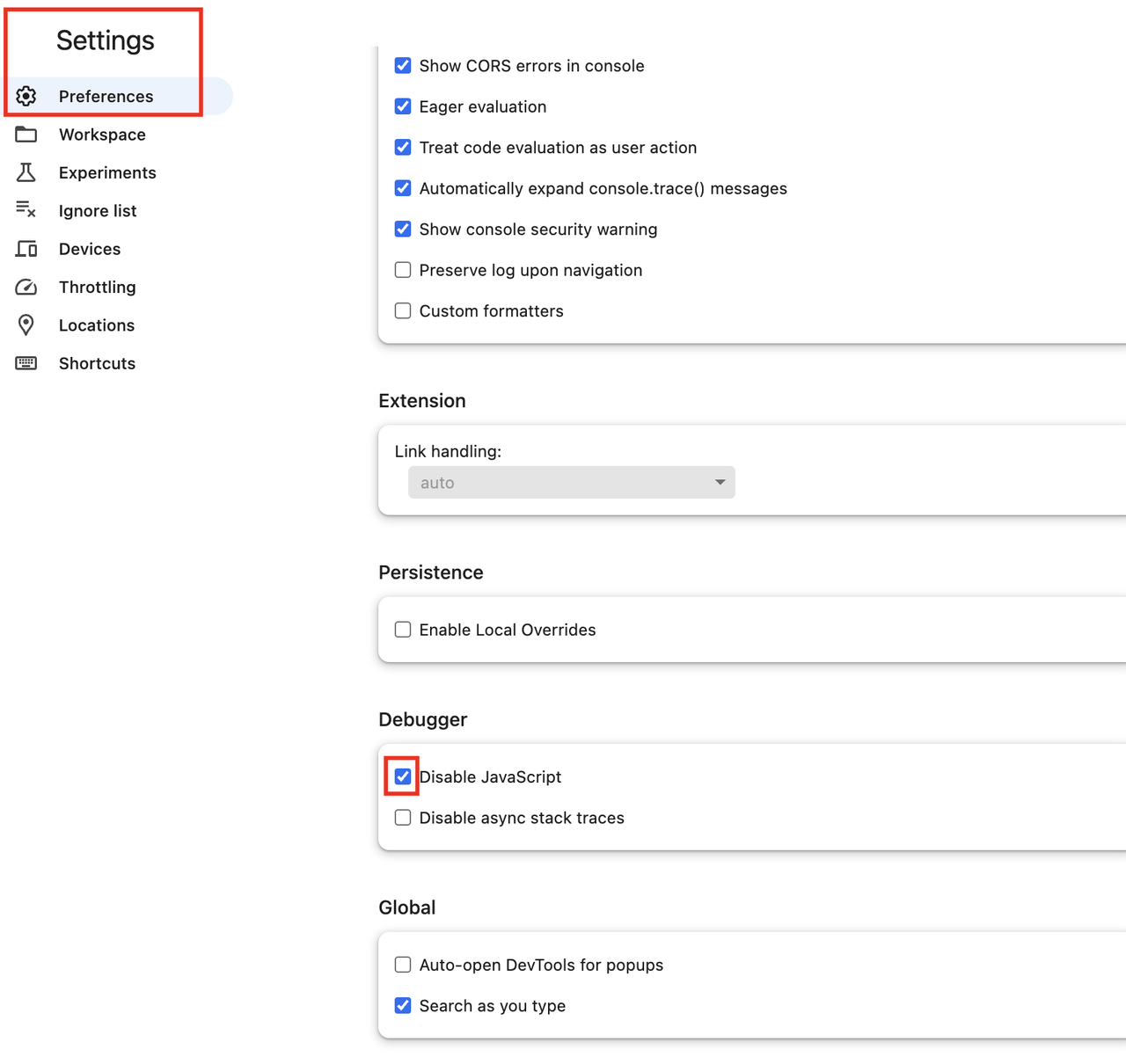
- `Disable JavaScript` 체크
- 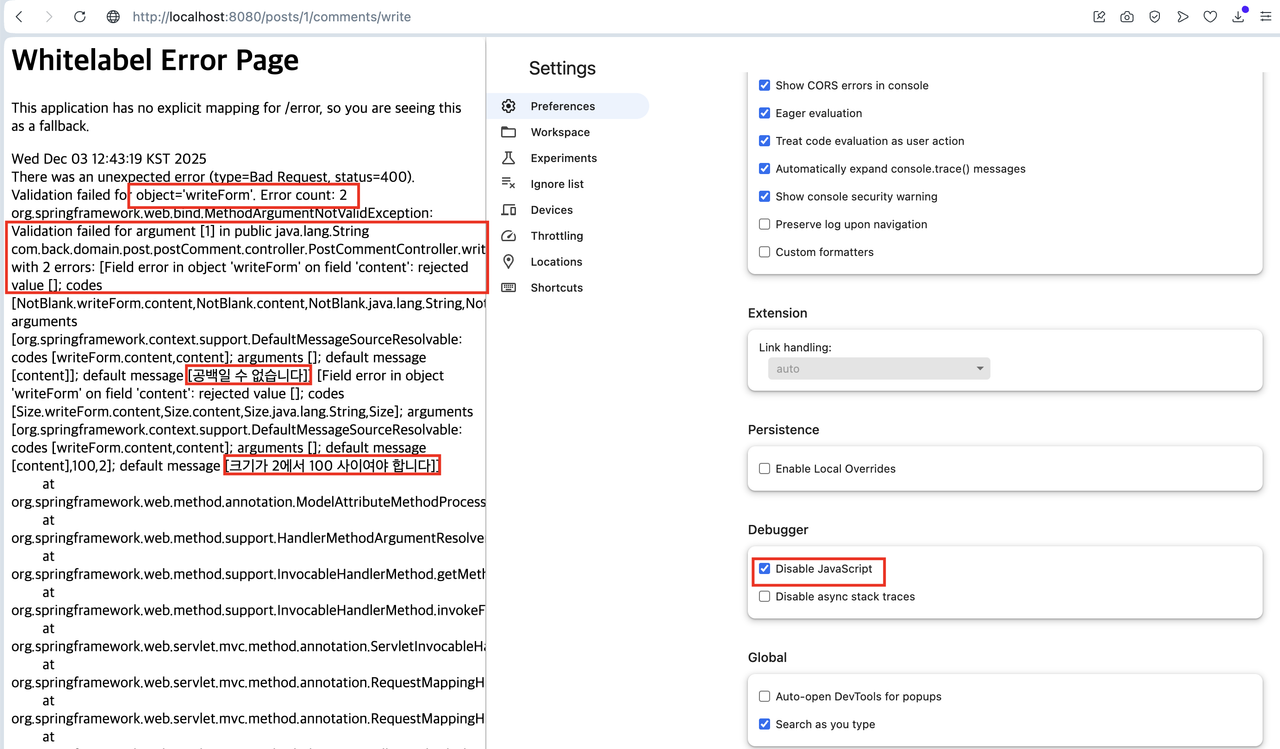
- 그 이후에 비어있는 폼을 제출하면 유효성 체크가 적용되지 않고 이런 메세지가 나오게 된다.
# 37강
- [37강, 댓글 삭제](https://youtu.be/dP7qZtoPkM4)
- [커밋 - 삭제기능 구현, 하지만 @OneToMany 옵션에 orphanRemoval 설정하지 않아서 실패](https://github.com/jhs512/p-13969-1/commit/06d1520)
- [신규](https://github.com/jhs512/p-14168-2/commit/037-1)
- [커밋 - orphanRemoval 설정하여 성공](https://github.com/jhs512/p-13969-1/commit/7b2cacd)
- [신규](https://github.com/jhs512/p-14168-2/commit/037-2)
- [커밋 - a 버튼에 onclick="return false;" 추가하여 일단 삭제 안되도록](https://github.com/jhs512/p-13969-1/commit/9e5bf0e)
- [신규](https://github.com/jhs512/p-14168-2/commit/037-3)
- [커밋 - false 대신 confirm('정말 삭제하시겠습니까?'); 로 교체하여 confirm 창에서 '확인' 누른경우만 요청발생하도록](https://github.com/jhs512/p-13969-1/commit/4033540)
- [신규](https://github.com/jhs512/p-14168-2/commit/037-4)
- [커밋 - 조금 더 정밀한 작동을 위해서 BaseEntity에 equals, hashCode 오버라이딩](https://github.com/jhs512/p-13969-1/commit/27241fd)
- [신규](https://github.com/jhs512/p-14168-2/commit/037-5)
## @OneToMany 각 속성 설명
```java
@OneToMany(mappedBy = "post", cascade = {PERSIST, REMOVE}, orphanRemoval = true)
```
### 1) mappedBy = "post"
- 양방향 연관관계에서 연관관계의 주인(Owner)을 지정하는 속성
- 여기서는 PostComment 엔티티 내부의 post 필드가 주인이라는 의미
- 즉, FK(post_id)는 PostComment 테이블에 존재
#### 요약
- Post → 주인 아님
- PostComment.post → 연관관계의 주인
---
### 2) cascade = {PERSIST, REMOVE}
#### PERSIST
- Post(부모)를 저장(혹은 더티체킹)할 때 연관된 모든 PostComment(자식)도 자동 저장됨(INSERT)
#### REMOVE
- Post를 삭제하면 연관된 모든 PostComment도 자동 삭제됨
- 참고로 PostComment들이 먼저 삭제됨
#### 요약
- PERSIST → 저장 시 자식 자동 저장
- REMOVE → 삭제 시 자식 자동 삭제
---
### 3) orphanRemoval = true
- 부모(Post)의 컬렉션에서 자식(PostComment)을 제거하면 DB에서도 자동 DELETE
- 즉, 부모와의 연결이 끊긴 고아 객체를 자동 제거하는 기능
#### 예시
```java
post.getComments().remove(comment); // 트랜잭션 커밋 시 comment row DELETE
```
#### cascade REMOVE와 차이점
| 기능 | 삭제 시점 |
|------|-----------|
| cascade = REMOVE | 부모(Post)가 삭제될 때 자식도 삭제 |
| orphanRemoval = true | 부모 컬렉션에서 제거된 자식만 삭제됨 |
---
### 전체 요약 테이블
| 속성 | 설명 |
|------|------|
| mappedBy = "post" | 연관관계 주인은 PostComment.post |
| cascade = PERSIST | Post 저장(OR 더티체킹) 시 comments 자동 저장(INSERT) |
| cascade = REMOVE | Post 삭제 시 comments 자동 삭제 |
| orphanRemoval = true | comments 리스트에서 제거된 자식 자동 DELETE |
## equals 오버라이딩의 의미
- **기본 동작**: 자바는 두 객체가 완전히 같은 메모리 주소를 가져야만 "같다"고 봅니다.
- 비유: 일란성 쌍둥이라도 엄연히 다른 사람 취급하는 것과 같습니다.
- **오버라이딩 후**: ID(식별자)가 같으면 같은 객체로 봅니다.
- 비유: 주민등록번호가 같으면, 엄연히 서로 다른 사람이라고 하더라도 같은 사람으로 취급하는 것과 같습니다.
- **왜 필요한가요?**: 리스트에서 댓글을 삭제(`remove`)할 때, 자바가 "아, ID가 같으니 같은 댓글이구나"라고 인식해서 정확히 찾아 지울 수 있게 하기 위함입니다.
- **이제 이런식으로도 특정 댓글을 삭제할 수 있다.** : `post1.getComments().remove(new PostComment(1));`
## hashCode 오버라이딩의 의미
- **기본 동작**: 객체의 메모리 주소를 기반으로 고유한 숫자(해시코드)를 만듭니다.
- **오버라이딩 후**: ID(식별자)를 기반으로 고유한 숫자를 만듭니다.
- **왜 필요한가요?**: `HashSet`이나 `HashMap` 같은 자료구조는 객체를 저장할 때 `hashCode`가 필요합니다. 그래서 지금은 우리에게 이 메세드의 오버라이딩이 필요없습니다. 다만 equals 오버라이딩 할 때 hashCode 도 오버라이딩 하는게 관례라서 구현했습니다.
# 38강
- [38강, 조금 더 빠른 비교를 위해서 equals에 동치성 비교도 추가](https://youtu.be/TfGPndJWPFM)
- [커밋](https://github.com/jhs512/p-13969-1/commit/0d5c959)
- [신규](https://github.com/jhs512/p-14168-2/commit/038)
## 동치성과 동등성
- **동치성 (Identity)**: `==` 비교. 두 객체가 메모리상에서 **완전히 같은 주소**를 가리키는지 확인합니다.
- 비유: "철수"라는 사람이 거울을 보고 있는 상황. 거울 속의 철수와 실제 철수는 **완전히 같은 사람**입니다.
- **동등성 (Equality)**: `equals()` 비교. 두 객체가 메모리 주소는 다르더라도, **내용(값)이 같은지** 확인합니다.
- 비유: "철수"와 "철수의 복제인간". 둘은 엄연히 다른 생명체지만, DNA와 생김새가 똑같으므로 **동등한 존재**라고 볼 수 있습니다.
# 39강
- [39강, 댓글 수정 처리](https://youtu.be/uoFzdOdYPNQ)
- [커밋 - 댓글 수정 폼, 댓글 수정 폼 데이터 처리](https://github.com/jhs512/p-13969-1/commit/f3e4138)
- [신규](https://github.com/jhs512/p-14168-2/commit/039-1)
- [커밋 - 댓글 수정 폼에서 유효성 체크하는 자바스크립트 추가](https://github.com/jhs512/p-13969-1/commit/9633d64)
- [신규](https://github.com/jhs512/p-14168-2/commit/039-2)
# 40강
- [40강, 폼 DTO 클래스를 record 문법으로 구현하여 코드량을 줄임](https://youtu.be/4omtJVJ08Lk)
- [커밋](https://github.com/jhs512/p-13969-1/commit/8b81cc7)
- [신규](https://github.com/jhs512/p-14168-2/commit/040)
## class vs record
| 구분 | class | record |
|------|-------|--------|
| **용도** | 일반적인 클래스 정의 | 데이터 전달용 클래스 (DTO) |
| **생성자** | 명시적으로 작성 필요 | 자동 생성 |
| **getter/setter** | 명시적으로 작성 필요 | getter만 자동 생성 (setter 없음) |
| **equals/hashCode** | 명시적으로 작성 필요 | 자동 생성 |
| **toString** | 명시적으로 작성 필요 | 자동 생성 |
| **불변성** | 가변 객체 (기본) | 불변 객체 |
| **상속** | 가능 | 불가능 (final) |
| **추상화** | 가능 | 불가능 |
| **메서드 추가** | 자유롭게 가능 | 제한적 |
| **메모리 사용** | 일반적 | 효율적 |
| **가독성** | 코드량 많음 | 코드량 적음 |
## WriteForm : class 버전
```java
@AllArgsConstructor
@Getter
public static class WriteForm {
@NotBlank
@Size(min = 2, max = 100)
private final String title;
@NotBlank
@Size(min = 2, max = 100)
private final String content
}
```
## WriteForm : record 버전
```java
record WriteForm(
@NotBlank
@Size(min = 2, max = 100)
String title, // 기본적으로 final, 그래서 setter가 없고 수정하려면 객체 자체를 다시 만들어야 한다.
@NotBlank
@Size(min = 2, max = 100)
String content // 기본적으로 final
) {
}
```
# 41강
- [41강, _method 파라미터를 통해서 액션 메서드에서 PutMapping, DeleteMapping 도 사용할 수 있도록 변경](https://youtu.be/l7n1rqv_eHU)
- [커밋](https://github.com/jhs512/p-13969-1/commit/ac6990b)
- [신규](https://github.com/jhs512/p-14168-2/commit/041)
## spring.mvc.hiddenmethod.filter.enabled 활성화 전/후 비교
### application.yml
```yml
spring:
# ...
mvc:
hiddenmethod:
filter:
enabled: true # 활성화
# ...
# ...
```
### src/main/resources/templates/post/postComment/modify.html
#### 원래 코드
```html